





The SILENT MANGA AUDITION® (SMA) isn’t just a manga competition, it’s a gateway to your potential Japanese manga debut. By winning high awards in the contest, you will be invited to join the SMA MasterClass where our dedicated team of editors will help improve your abilities for a potential debut through a series of exclusive opportunities.
A Silent Manga is a visual narrative told without dialogue, that relies entirely on illustration alone. You may, however, make use of onomatopoeia by incorporating SFX into your art.
We welcome all emotions – happiness, sadness, and everything in-between.
Like a good chef, the mixing of opposing flavors can sometimes produce the best results!
The entries will be judged mainly on “the creator’s ability to direct an effective narrative through an entertaining story.” As a creator, your story should be able to ignite your reader’s imagination!
The SMA Judges assess each entry’s “message and how it makes the reader feel within a short, limited number of pages.” There are no limitations to what you can draw, as long as it’s an original creation that perfectly captures the theme.
The page count for a single SMA entry is 17 pages or less. (The page count may change depending on the round so please be sure to always check the current round announcement page).
Paper
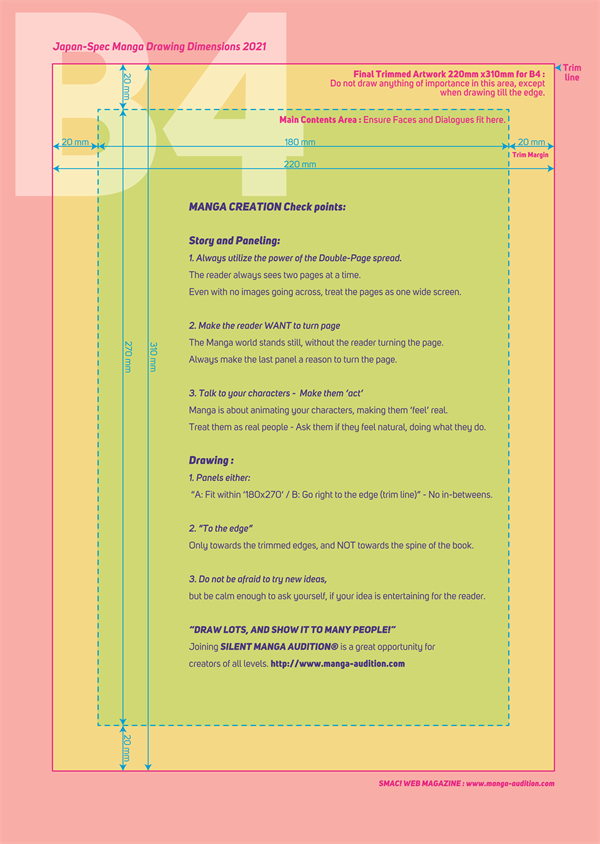
Entries should be TRIMMED at the trim lines before uploading to the Entry System.
We recommend starting your manga as A SINGLE PAGE on the left side of the spread.
Your manga should be drawn from right-to-left (Japanese standard).

Check out our tutorial on how to set up and export your pages in Clip Studio Paint EX!
Preparing the image data of your work (data format).
Please prepare the image data of your work according to the format below. (One image file for each page / two-page spread divided into two image
files).
Once finished, please put all of your files into one folder and then compress it into a zip file.
Pages MUST BE uploaded as “1 page / 1 image”. For “double page spreads,” please upload each page as “2 separate image files.”

If the file name is not correct, it may be displayed in the wrong order after uploading.
[Correct example]: page_01.jpg, page_02.jpg, etc. …
[Incorrect example]: page1.jpg, 1_page.jpg, etc. …
*NOTE: Be sure to omit the first zero when you reach double figures.
[Correct example]: page_10.jpg, page_11.jpg, etc. …
[Incorrect example]: page_010.jpg, page_011.jpg, etc. …
Images will be displayed on the web exactly as you upload them, so please be careful about gutter, trim marks, etc.
The following information is required when you upload your entry on our web system.
At the time of the results announcement, the following information will be published on our website along with your entry.
In the event that you win an award, we will contact you individually via email to ask for the below information. This information is necessary for international bank transfers, and will not be used for any other purposes. At the time of submitting your entry, you will only be asked for your pen name.
Please submit your entry via our Google Form. Please be aware that, in order to submit, you must have a Gmail account. If you do not have a Gmail account, please create one before submitting.
Once your Gmail account is ready, follow the above guidelines regarding file size, file name, and file type. Then, compress your entry into a zip file and upload it via the Google Form.
If your upload has been received successfully, you will receive an automated email confirming your submission. If there were any issues with your submission, you will receive an automated email that details the issues and asks you to resubmit. The email will have the subject line “Submission Issue – Action Required” and will appear as below.
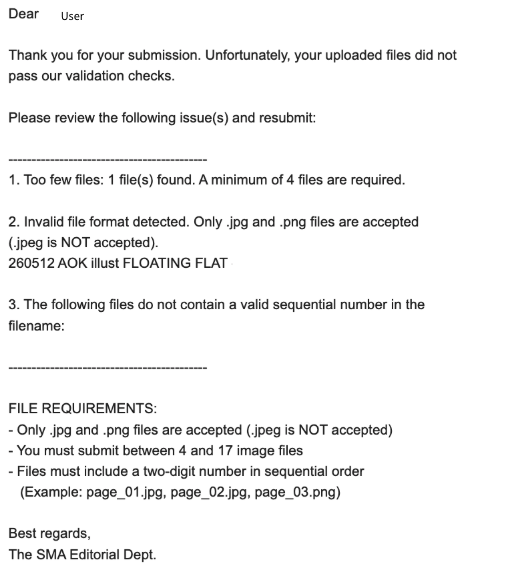
If there are any issues with the content of your submission (i.e., dialogue, nudity, explicit violence, etc.), the Editorial Department will get in contact with you privately via email, so please be sure to check your Gmail account regularly.
It is not possible to edit an entry once it has been submitted, so if there are any issues with your entry, please edit it and resubmit it through the same form. If you have submitted multiple entries, but you would only like one to be considered, please contact the SMA Editorial Department via our Online Inquiry Form , and the Editorial Department will delete any entries you would not like to be considered.
The deadline for each round is listed on the current round announcement page.
*However, we will consider delays due to internet connectivity issues, etc. In this case, the SMA Editorial
Department will approve your entries, so please do not panic even after the deadline.
The results will be announced between three to four months after the deadline, and the exact date will be announced through the SMA social media accounts.
SMA winners will be contacted via email in one to two weeks after the results are announced. The SMA Editorial Dept. will then guide all of the winners through the process of receiving their prizes!
